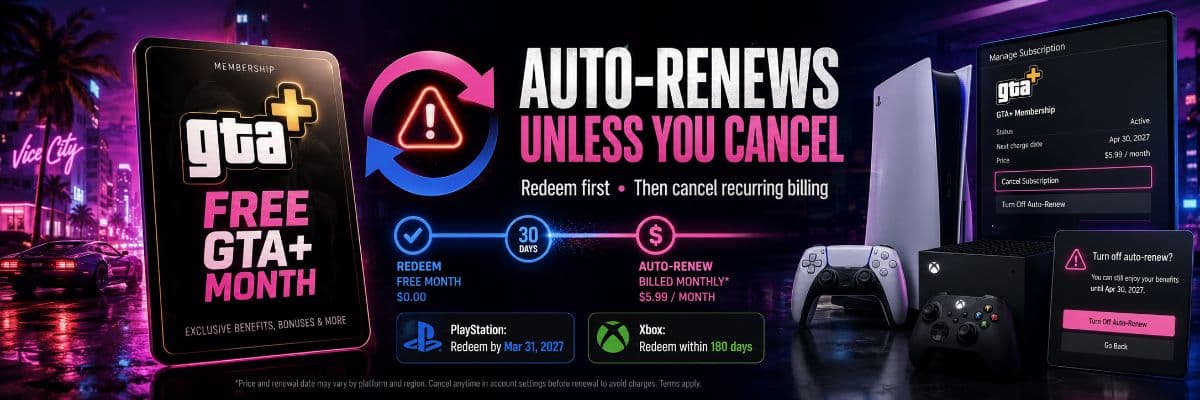
GTA 6's free month of GTA+ becomes a paid monthly subscription after you redeem it unless you cancel.
Simply pre-ordering GTA 6 does not activate GTA+. The purchase gives eligible digital buyers a redeemable offer. You choose whether and when to claim it. If you never redeem the offer, no GTA+ membership starts and there is nothing to renew.
Once you redeem it, normal subscription rules begin.
Rockstar's support page says that after the included month, GTA+ renews monthly at the regular price until canceled. The redemption screen should show the renewal date and local price before activation.
That makes this a normal subscription trial, not a permanently free bonus.
Pre-ordering and redeeming are separate actions
A fresh r/GTA6 discussion shows why buyers are confused.
Some people saw “Free Month of GTA+” on the pre-order page and assumed Rockstar immediately attached a monthly membership to the game purchase. Others assumed the month would simply stop because it was described as free.
Neither is correct.
The pre-order unlocks the right to redeem one month. GTA+ begins only after the player visits the relevant platform page and accepts the offer.
You can buy GTA 6, leave the bonus untouched for months and redeem it closer to launch. You can also ignore it completely if you do not want another subscription linked to your account.
The billing risk starts after activation, not after buying GTA 6.
Rockstar's auto-renew wording is clear
Rockstar's redemption FAQ says the membership automatically renews every month at the regular monthly price after the free period ends, unless canceled.
Rockstar's broader GTA+ legal terms say the same thing: membership uses recurring monthly payments.
This is common for free trials.
It is also easy to forget.
A player may redeem the month for a GTA Online vehicle, the monthly GTA$ deposit, discounts or the included games library, then stop thinking about it. When the trial expires, the platform can charge the saved payment method.
The charge does not come from merely pre-ordering GTA 6.
It comes from activating a recurring membership.
PlayStation users can redeem through March 31, 2027
Eligible PlayStation Store buyers receive a fixed redemption deadline.
Rockstar says the month must be claimed by March 31, 2027. The offer applies to customers who purchase the digital Standard or Ultimate Edition of GTA 6 before November 20, 2026.
That means PlayStation users do not need to activate GTA+ immediately.
They can save it for launch month, a valuable GTA Online membership period, a month when they want the games library or another time when the benefits are useful.
Waiting can be smarter than redeeming it simply because the checkout page mentions it.
Xbox users have 180 days from purchase
Xbox uses a different system.
Rockstar says Xbox customers must redeem the offer within 180 days after buying an eligible digital Standard or Ultimate Edition. The purchase must also happen before November 20, 2026.
The deadline therefore depends on the purchase date.
Someone who pre-orders early may need to claim the month earlier than someone who buys close to release. Xbox users should check the Offers & Credits section of the Store and note the displayed expiration date.
Do not assume the PlayStation March 2027 deadline applies to Xbox.
Cancel immediately and keep the free month
Players do not need to wait until the final day to cancel.
After redeeming GTA+, open the platform subscription settings and turn off recurring billing or cancel the subscription. Access should remain available until the current membership period ends, while the next paid renewal is stopped.
The safest sequence is simple:
- Redeem the offer.
- Confirm the expiration date.
- Turn off recurring billing immediately.
- Save a screenshot showing the next charge is disabled.
You can reactivate later if the membership proves useful.
Canceling early does not waste the month. It stops month two.
How to cancel GTA+ on PS5
PlayStation lists GTA+ among subscriptions managed through the console, web browser or PlayStation App.
On PS5:
- Open Settings.
- Select Users and Accounts.
- Choose Account.
- Open Payment and Subscriptions.
- Select Subscriptions.
- Choose GTA+.
- Select Cancel Subscription.
On the web, sign in to PlayStation Account Management, choose Subscription, find GTA+ and select Cancel.
In the PlayStation App, open PlayStation Store, use the menu and choose Subscriptions Management.
Check that the account now shows an end date instead of another payment date.
How to cancel GTA+ on Xbox
Xbox subscriptions are managed through the Microsoft account used to redeem the offer.
The main route is:
- Open Microsoft's Services & subscriptions page.
- Sign in with the correct account.
- Find GTA+.
- Select Manage.
- Turn off recurring billing or cancel the subscription.
You can also view memberships through Xbox console settings under Account and Subscriptions.
The wording may differ by country. One page may say “Turn off recurring billing” while another says “Cancel.”
The result should be the same: no further monthly charge.
Removing a payment card does not cancel GTA+
Do not delete the saved card and assume the subscription is gone.
PlayStation explicitly warns that removing payment details does not cancel an active subscription. The account may still use wallet funds, another payment method or request updated billing information.
Cancel the GTA+ membership itself.
This is worth stating because users often treat deleting a card as a substitute for managing a subscription. It is not the clean or reliable method.
After canceling, keep a screenshot of the status and next-payment information.
The monthly price varies by region
Rockstar does not promise one worldwide renewal amount.
GTA+ pricing differs by storefront, region, currency and taxes. Future price changes are also possible. The activation screen should display the regular monthly charge before you confirm redemption.
Read that screen.
Do not rely on a US screenshot when your account is in India, Europe or another market. The consumer warning is not one universal dollar figure.
It is that the price stops being zero when the trial ends.
The offer is limited to one redemption
Rockstar limits the bonus to one redemption per platform account.
Buying both GTA 6 editions does not create two free months. Refunding GTA 6 and pre-ordering again also does not generate another offer, according to Rockstar's FAQ.
Use the correct account when redeeming.
Before confirming, check the platform profile, linked Rockstar account, expiration date, renewal price and next payment date. An accidental redemption on the wrong profile may not be replaceable.
Physical and code-box orders may not qualify
Rockstar describes the month as a digital Store pre-order bonus.
Its official instructions cover eligible digital purchases through PlayStation Store and Xbox Store. That is different from ordering the physical-looking code-in-box version through Amazon or another retailer.
Both may deliver digital licenses, but promotional eligibility depends on the storefront and offer terms.
If a retailer page does not explicitly list the free GTA+ month, do not assume it is included.
What GTA+ currently offers
GTA+ is Rockstar's optional membership for GTA Online on supported systems.
Benefits can include a monthly GTA$500,000 deposit, claimable vehicles, discounts, bonus rewards, Vinewood Club features and access to a rotating games library. The package changes over time.
An active GTA Online player may get real value from a free month.
Someone who does not play GTA Online may get almost nothing from it.
A free trial is only useful when you remember the paid renewal behind it.
GTA+ does not provide confirmed early GTA 6 access
Rockstar has not announced early GTA 6 access for GTA+ members.
The included month does not currently promise an early story unlock, a GTA 6 Online beta, launch priority or a separate multiplayer edition.
Fans suspect the bonus is designed to introduce millions of GTA 6 buyers to Rockstar's subscription service. That is a reasonable business interpretation, not confirmation of a future GTA 6 Online requirement.
Redeem the month for benefits that exist, not imagined access that Rockstar has not announced.
Why Rockstar bundles a subscription trial
The offer gives a massive pre-order audience a reason to try GTA+.
Some people will redeem it, collect the benefits and cancel. Some will decide the membership is useful. Others will forget to cancel and pay for at least one more month.
That is how subscription trials work.
Rockstar discloses the recurring-payment terms. The controversy is that the large “free month” message is easier to notice than the renewal condition.
Legal disclosure and clear consumer understanding are not always the same thing.
Do not rely only on a reminder
A phone reminder can fail. It may be entered for the wrong date, dismissed accidentally or arrive after the platform has already billed the account.
Turning off recurring billing immediately is safer.
The free month remains active. The future payment disappears. You can reactivate before the end date if you want to continue.
There is little reason to leave auto-renew enabled during a trial unless you already intend to pay for the next month.
Subscriptions make money from people doing nothing.
Do something once.
What if GTA+ already charged you?
If the membership renews, the platform charges the saved payment method and starts another billing period.
Refund rules differ by platform, country and timing. Do not assume a recurring charge will be refunded simply because you forgot to cancel.
Contact PlayStation or Xbox support quickly. Keep the renewal email, receipt and any cancellation screenshots.
Rockstar directs billing problems to the platform where the subscription was purchased.
Preventing the payment is easier than disputing it afterward.
The consumer-safe way to use the offer
Follow this order:
- Confirm your digital GTA 6 purchase includes the bonus.
- Check your platform's redemption deadline.
- Wait for a month when the GTA+ benefits are useful.
- Read the displayed renewal price and date.
- Redeem the free month.
- Cancel or disable recurring billing immediately.
- Save proof of the canceled status.
- Use the membership until the included month expires.
That turns the promotion into what many buyers assume it already is: one free month and nothing else.
The simple answer
Does GTA 6's free GTA+ month automatically charge you?
Not when you pre-order.
It becomes a recurring paid membership only after you choose to redeem it. Once activated, it renews monthly at the regular price unless canceled.
PlayStation users can claim it through March 31, 2027. Xbox users receive 180 days from their purchase date. Both can cancel recurring billing immediately after activation and keep access until the free period ends.
The first month is free.
Forgetting about the next one is not.