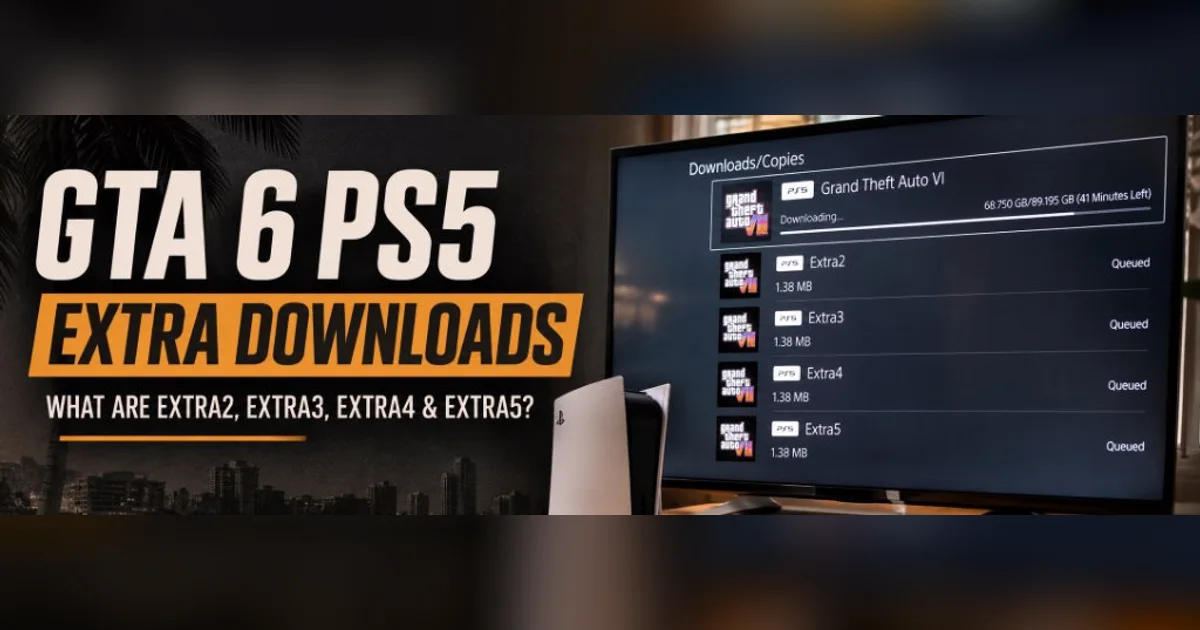
GTA 6 launches on November 19, 2026, and PlayStation 5 players are already preparing their consoles for the biggest game release of the year. But alongside the main Grand Theft Auto VI preload, some PS5 users have noticed additional download entries named Extra2, Extra3, Extra4 and Extra5. What are these files? Are they required before downloading GTA 6? Do they contain additional missions, GTA V bonuses or special content?
Rockstar Games has officially opened the GTA VI digital preload for digital pre-orders, and PlayStation recommends keeping at least 212GB of storage available. However, the mysterious PS5 add-on entries have created confusion among players, particularly those checking their game content, download queues and storage screens.
With the worldwide launch approaching tomorrow, this guide explains the additional PS5 downloads, the difference between game files and add-on licences, the official preload requirements, how to prepare your console and when GTA 6 becomes playable.
---
GTA 6 Release Date and Launch Time
Grand Theft Auto VI officially releases on Thursday, November 19, 2026.
Rockstar Games has confirmed that the game will launch on PlayStation 5 and Xbox Series X|S. The release follows years of anticipation, with players finally getting the opportunity to explore modern-day Vice City and the wider fictional state of Leonida.
According to Rockstar's regional release schedule, GTA VI becomes available at midnight local time on November 19.
| Detail | Information | |
|---|---|---|
| Game | Grand Theft Auto VI | |
| Release date | November 19, 2026 | |
| Midnight unlock | 12:00 AM local time (November 19) | |
| India release time | 12:00 AM IST (Nov 19) / 6:30 PM UTC (Nov 18) | |
| Main platforms | PlayStation 5 and Xbox Series X | S |
| PS5 preload date | November 10, 2026 (Live now) | |
| Recommended available storage | At least 212GB | |
| Day one patch size | ~1.6 GB on PS5 (v1.002) | |
| Developer / Publisher | Rockstar Games |
The Indian PlayStation Store may display a release timestamp of November 18 at 6:30 PM UTC. This is the exact same moment as midnight on November 19 in India (IST). It does not mean that Indian players receive an early release. Check the complete regional unlock schedule for other time zones.
---
GTA 6 PS5 Extra Downloads Explained: What Are Extra2, Extra3, Extra4 and Extra5?
One of the more confusing discoveries surrounding the GTA 6 preload is the appearance of additional PS5 content entries.
Some players checking their pre-ordered copy of Grand Theft Auto VI have reported seeing four separate items:
- Extra2
- Extra3
- Extra4
- Extra5
These entries appear alongside the main GTA VI game in certain PlayStation 5 content and storage screens. The unusual part is that these entries are very small compared with the main game. Reports based on PS5 screenshots put their individual sizes at approximately 1.38MB each.
Some screenshots also show the entries carrying a label that says they are shared with Grand Theft Auto V.
| PS5 content entry | Reported size | What is known |
|---|---|---|
| Extra2 | Approximately 1.38MB | Reported as an additional PS5 package; shared label with GTA V |
| Extra3 | Approximately 1.38MB | Reported as an additional PS5 package; shared label with GTA V |
| Extra4 | Approximately 1.38MB | Reported as an additional PS5 package; shared label with GTA V |
| Extra5 | Approximately 1.38MB | Reported as an additional PS5 package; shared label with GTA V |
Are Extra2, Extra3, Extra4 and Extra5 GTA V rewards?
The reported PS5 storage screens show that these packages are shared with Grand Theft Auto V. That is an interesting detail, but it does not independently establish what the packages contain or what benefits they provide.
Some community discussions have suggested that the entries could be related to:
- Existing GTA V ownership verification
- GTA+ membership cross-game benefits
- Digital entitlement keys for loyalty rewards
- Social Club / Rockstar Games account linking data
Those explanations remain unverified. Rockstar has not published an official statement identifying the contents of Extra2, Extra3, Extra4 or Extra5.
Players should therefore avoid treating these entries as confirmed GTA VI missions, exclusive vehicles, GTA V rewards or additional gameplay features. The most accurate description at present is that they are small, reported PlayStation content packages whose purpose has not been publicly documented by Rockstar.
Do players need to download these extra files before GTA 6?
No. There is currently no official Rockstar instruction saying that players must separately download Extra2, Extra3, Extra4 and Extra5 before installing the main GTA VI game.
Rockstar's preload instructions focus on the main game download, sufficient storage, account access and console download settings. PlayStation's GTA VI support guide also directs players to download the pre-ordered game through their PS5 Game Library.
The practical advice is straightforward:
- Make sure your GTA VI pre-order is registered to the correct PlayStation account.
- Start or verify the main GTA VI preload.
- Do not assume that the mysterious additional entries are separate mandatory game installations.
- Avoid deleting unfamiliar game-content entries just because their names are generic.
- Check Rockstar and PlayStation support for official instructions before making changes.
---
GTA 6 Ultimate Edition Add-ons vs Extra2-Extra5 Files
Another reason for the confusion is that GTA VI also has additional content associated with the Ultimate Edition and pre-order bonuses. These are not the same thing as the mysterious Extra2, Extra3, Extra4 and Extra5 entries.
Rockstar offers two digital editions:
- Standard Edition: Includes the main Grand Theft Auto VI game, the associated Vintage Vice City Pack and a promotional GTA+ offer when eligible.
- Ultimate Edition: Includes the main game and the Ultimate Edition Upgrade, which provides an exclusive collection of vehicles, weapons, apparel and items connected to Jason and Lucia's story.
Some PS5 users have reported that the Ultimate Edition Upgrade and Vintage Vice City Pack appear under a section labelled Add-ons (in-game licences) in Manage Game Content.
This distinction matters because an in-game licence is not the same thing as a large downloadable mission pack. A licence simply establishes that a PlayStation account owns particular content. The main game files already contain the assets, and the licence unlocks them when the game boots.
How to check whether your Ultimate Edition content is registered
- Find the Grand Theft Auto VI tile on your PS5 home screen.
- Press the Options button on the DualSense controller.
- Open Manage Game Content.
- Look for the available add-ons and licence entries.
- Check whether your purchased upgrade or bonus pack is listed.
If a purchased upgrade does not appear, check your PlayStation Store purchase history and confirm that the transaction was completed on the correct account. Do not assume an Ultimate Edition purchase has failed simply because a separate 50GB mission file is not appearing in the download queue.
---
How to Preload GTA 6 on PS5
Digital preloading opened on November 10, 2026. Eligible players who pre-ordered the game digitally can install the main game files now to prepare for launch day.
Note: Preloading does not grant early access to the game. GTA VI remains encrypted and locked until the midnight unlock on November 19.
- Sign in to your PlayStation account: Sign in to the exact account used to purchase or pre-order GTA VI.
- Open Game Library: From the PS5 home screen, go to Game Library > Your Collection > Grand Theft Auto VI.
- Check the countdown timer: Select the timer counting down to release and check the automatic-download option.
- Enable automatic downloads: Ensure the checkbox next to GTA VI is selected so the console manages the download.
- Start the download manually if required: If the download has not started automatically, select the download button on the game page.
- Keep the console connected in Rest Mode: In Settings > System > Power Saving > Features Available in Rest Mode, turn on Stay Connected to the Internet.
- Monitor the download: Open Downloads/Uploads from the Control Centre to confirm the installation has finished.
---
GTA 6 PS5 Storage Requirements: How Much Space Do You Need?
Rockstar's official preload FAQ states that Grand Theft Auto VI requires up to 212GB of available storage, depending on the device. PlayStation's official GTA VI preparation guide also recommends clearing at least 212GB of space on the PS5.
Additionally, Day One Patch v1.002 adds approximately 1.6 GB on PS5 and 3.8 GB on Xbox Series X|S.
| Storage consideration | Official recommendation |
|---|---|
| Official published requirement | Up to 212GB available space |
| Day one patch headroom | +1.6 GB on PS5 (v1.002 details) |
| Main game preload | Install directly through the PS5 Game Library |
| Old games | Remove games you no longer actively play |
| Capture gallery | Transfer or delete 4K video clips to free up SSD space |
| M.2 NVMe SSD | Ideal for expanding high-speed PS5 console storage |
| Extra free space | Keep 20-30GB extra buffer for future title updates |
To check your available storage: open Settings > Storage > Console Storage. For a deeper breakdown of system requirements, read our complete GTA 6 install size guide.
---
PS5 Settings to Check Before Launch
- Enable automatic game downloads: Go to Game Library > Your Collection > Grand Theft Auto VI, select the countdown timer, and verify automatic download is enabled.
- Enable internet access in Rest Mode: Open Settings > System > Power Saving > Features Available in Rest Mode and enable Stay Connected to the Internet.
- Update PS5 system software: Open Settings > System > System Software > System Software Update and Settings and install any pending updates.
- Check Console Sharing and Offline Play: In Settings > Users and Accounts > Other > Console Sharing and Offline Play, ensure the setting is enabled so you can play without server validation delays.
- Verify the main installation: Check Downloads/Uploads in the Control Centre to confirm that Grand Theft Auto VI shows as installed.
---
What If GTA 6 Is Not Downloading on PS5?
- Problem: Game appears in library but will not start downloading. Select the countdown timer on the game page, toggle automatic download off and on, or start the download manually.
- Problem: Download is stuck or paused in Downloads/Uploads. Pause the download, wait 10 seconds, and resume. If still stuck, cancel the download, delete the incomplete installation, restart your PS5, and restart the download from your Game Library.
- Problem: Error CE-100005-6 (Not enough storage). Clear at least 212GB of space on your internal console storage or M.2 SSD.
- Problem: The preload finished but the game remains locked. This is normal. The padlock icon will disappear automatically at midnight local time on November 19.
---
Does the GTA 6 Physical Edition Include a Disc?
An important detail for PlayStation buyers is that the physical code-in-box package does not include a game disc. According to PlayStation's GTA VI support documentation, the package contains a digital download voucher.
Players redeem the code via PlayStation Store > Redeem Code and then download the game from Sony's servers.
---
Final Verdict: What PS5 Players Should Do Tonight
With Grand Theft Auto VI launching on November 19, players are naturally inspecting every single file on their consoles.
The appearance of Extra2, Extra3, Extra4 and Extra5 has sparked curiosity because of their small 1.38MB size and shared-content GTA V tag. However, the confirmed facts are clear:
- Rockstar has officially opened the preload.
- PlayStation recommends 212GB of available storage.
- The game unlocks worldwide at midnight local time on November 19.
- Extra2 through Extra5 are not required manual installations and should not be deleted.
Spend the remaining hours checking your available SSD space, verifying your pre-order license, and keeping your PS5 in Rest Mode.
Grand Theft Auto VI arrives on November 19, 2026. See you in Vice City.